


Schema Markup in SEO: Enhancing Rich Snippets
By on

In today’s fiercely competitive digital landscape, standing out in search engine results can be a challenge. Whether you're an e-commerce business, a local company, or a content publisher, improving your visibility online is crucial. Schema markup, a form of structured data, is an essential tool that can dramatically boost your online presence by enhancing how search engines understand and display your website's content. Despite being around since 2011, many businesses are still unaware of the full potential of schema markup. It’s more than just a technical SEO feature—it’s a strategic way to improve how search engines interpret your data and deliver your content to users. For those looking to maximize their website’s performance, schema markup can significantly enhance search engine visibility, leading to more traffic, higher click-through rates (CTR), and a stronger overall online presence.
What is Schema Markup?
Schema markup is a type of structured data that you can add to your website’s HTML to help search engines better understand the content on your page. It acts like a digital dictionary, providing search engines with the meaning behind your content rather than just showing the raw text. By tagging specific pieces of information—like product names, prices, ratings, authors, and events—you can improve how your content is represented in search results.
How Schema Markup Works
When a search engine crawls your site, it tries to interpret the data and context of each webpage. Without schema markup, the search engine has to rely on contextual clues to understand what’s on your page. Schema markup makes it easier by adding labels to specific pieces of information, clarifying their meaning for the search engine. This enables search engines to deliver more accurate and informative results to users. For example, a product page might include product reviews, prices, and availability. By using schema markup to label these elements, search engines can extract that data and display it directly in search results, often in the form of rich snippets, which include additional information such as star ratings and price tags. These visually appealing and informative results attract more users, leading to increased click-through rates. 
Types of Schema Markup
Schema markup is versatile, allowing you to label almost any type of content on your site. The most common types include:
- Product Markup: Displays key details about products such as price, availability, and customer reviews. This is particularly useful for e-commerce websites.
- Review Markup: Adds star ratings and review snippets, which can make your content more visually appealing and trustworthy.
- Local Business Markup: Essential for local SEO, it helps display critical information about your business, such as its name, address, phone number, and operating hours.
- Article Markup: Provides search engines with information about an article's title, author, and publish date, boosting visibility for publishers and bloggers.
- Event Markup: Displays detailed information about events, including the name, date, and location.
- Organization Markup: Provides comprehensive details about your organization, such as contact information, social media profiles, and your logo.
Why Schema Markup is Crucial for SEO
While schema markup doesn’t directly impact your search engine rankings, it plays a pivotal role in improving how search engines understand your site, which can lead to several indirect SEO benefits. Here’s why schema markup is essential for any comprehensive SEO strategy:
1. Enhanced Search Result Appearance
Schema markup enables your web pages to be displayed as rich snippets in search engine results, making your listings stand out. These rich snippets can include additional visual elements like star ratings, product images, prices, and availability. By making your results more visually appealing and informative, schema markup increases the likelihood of clicks, ultimately improving your site’s CTR.
2. Improved Local SEO
Local businesses benefit greatly from schema markup. Local business markup allows you to showcase vital business information—such as your name, address, phone number (NAP), and hours of operation—directly in search results. This is critical for driving foot traffic and local searches, as users can easily access the information they need to visit your physical location.
3. Increased Click-Through Rates (CTR)
Pages with rich snippets generated by schema markup often outperform pages without them in terms of CTR. The additional information and visual enhancements make your search result more attractive and relevant to users, encouraging more clicks.
4. Optimized for Voice Search
With the increasing popularity of voice-activated assistants like Google Assistant, Alexa, and Siri, optimizing your content for voice search is becoming more critical. Schema markup helps search engines understand the context of your content, which is especially important for voice search queries, which tend to be more conversational and often return direct answers.
5. Gaining a Competitive Advantage
Despite its importance, many businesses still don’t use schema markup to its full potential. This presents an opportunity for forward-thinking businesses to gain a competitive edge by implementing schema markup and making their content more discoverable. For example, an e-commerce store that uses product schema to display customer reviews, prices, and availability will likely attract more attention than a competitor without this enhanced listing. 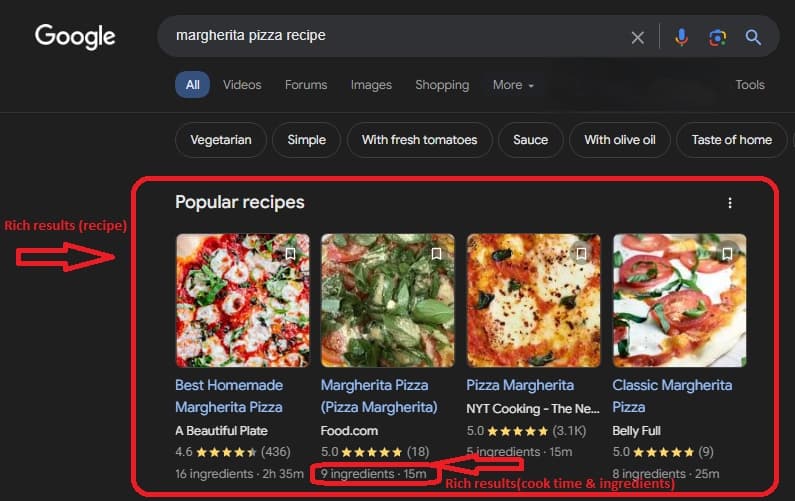
Step-by-Step Guide to Implementing Schema Markup
Now that we’ve explored the benefits of schema markup, let’s dive into how to implement it on your website. Here’s a step-by-step guide to getting started with schema markup, even if you don’t have extensive technical expertise.
1. Understand the Types of Schema Markup
Before diving into the technical aspects, it's important to familiarize yourself with the types of schema markup that are most relevant to your website. For example, if you run an online store, you’ll want to focus on product and review schema. If you operate a local business, local business schema will be key to improving your visibility.
2. Use Google’s Structured Data Markup Helper
Google provides a helpful tool called the Structured Data Markup Helper to make it easier for webmasters to generate schema markup without needing to write code from scratch. Here’s how to use the tool:
- Go to the Structured Data Markup Helper.
- Choose the type of content you want to mark up (e.g., Articles, Products).
- Enter the URL of the page you want to tag, or copy and paste the HTML directly into the tool.
- Highlight the elements you want to tag (e.g., product name, price, author name) and assign them to the corresponding schema categories.
- Once you’ve tagged all relevant elements, the tool will generate the schema markup for you. You can choose between JSON-LD, Microdata, or RDFa formats, though Google recommends JSON-LD for most websites.
- Add the generated code to the <head> section of your webpage.
3. Test Your Schema Markup
Before you go live, it's crucial to test your schema markup to ensure it’s implemented correctly. Google offers the Rich Results Test tool, which allows you to validate your markup and check for any errors or warnings. Testing your schema ensures that it can be properly processed by search engines and is eligible for rich results.
4. Monitor Your Schema Markup Performance
After implementing schema markup, it’s important to monitor its impact on your SEO performance. Tools like Google Search Console and third-party SEO platforms like Ahrefs or SEMrush can provide insights into how your rich snippets are performing, including click-through rates and impressions. Regular monitoring will help you refine your schema strategy and make any necessary adjustments. 
Let Top Organic Leads lead the way to SEO success — Contact us and transform your website's presence in search rankings!

Advanced Schema Markup Techniques and Best Practices
Once you’ve mastered the basics of schema markup, you can take your strategy to the next level with advanced techniques and industry best practices. These tips will help you optimize your schema for better results.
1. Use JSON-LD Format
While schema markup can be implemented using several formats, JSON-LD is the most widely recommended by Google. JSON-LD allows you to add structured data to your webpage without embedding it directly into the HTML, making it easier to maintain and update over time.
2. Provide Comprehensive Information
The more information you include in your schema markup, the better search engines can understand your content. For example, if you’re using product schema, make sure to fill out all available fields, such as product name, price, availability, SKU, brand, and review ratings. This ensures that search engines have all the necessary context to display your product in the most informative and engaging way possible.
3. Regularly Test and Update Your Schema
Schema markup isn’t a one-time task. As your website evolves, and as search engines introduce new features and guidelines, it’s essential to update your schema regularly. Test your schema markup every few months to ensure it’s still functioning correctly and taking advantage of any new opportunities for rich snippets. Additionally, if you make significant changes to your website—such as adding new products or services—be sure to update your schema markup to reflect these changes.
4. Avoid Misleading or Spammy Practices
It’s important to use schema markup in a way that accurately represents the content on your page. Don’t attempt to manipulate search results by adding irrelevant markup or overstuffing your schema with keywords. Misuse of schema markup can result in penalties, and your website may be excluded from rich results altogether. 
Frequently Asked Questions About Schema Markup
Q: Does schema markup directly impact search rankings? A: Schema markup doesn’t directly affect your ranking in search results, but it plays a key role in improving your website’s overall visibility and CTR, which can lead to indirect SEO benefits. Rich snippets often attract more clicks, which is a positive signal to search engines. Q: What are the best tools for implementing schema markup? A: Several tools can help simplify the process of adding schema markup to your website, including:
- Google’s Structured Data Markup Helper: A beginner-friendly tool for generating schema markup.
- Schema Pro: A WordPress plugin that automates schema implementation.
- SEMrush and Ahrefs: SEO platforms that provide schema auditing and implementation guidance.
Q: Can schema markup improve my voice search results? A: Yes! Schema markup helps search engines understand the context of your content, which is crucial for voice search queries. By providing structured data, you increase the chances of your content being featured as a direct answer in voice search results.
Partner with Top Organic Leads to Enhance Your SEO Strategy
At Top Organic Leads, we understand the power of schema markup and how it can revolutionize your SEO performance. By implementing structured data on your website, we can help you stand out in the crowded digital landscape, attract more traffic, and drive better results for your business. Our team of SEO experts specializes in leveraging advanced techniques, like schema markup, to elevate your online presence. Ready to take your SEO to the next level? Contact us today to learn how we can help you implement schema markup and other cutting-edge SEO strategies to grow your business.
Conclusion
In today’s dynamic world of SEO, schema markup is a must-have tool for businesses looking to improve their search engine visibility and outperform the competition. From increasing click-through rates to optimizing for voice search, schema markup offers a wide range of benefits that go far beyond basic rankings. By implementing schema markup on your website, you can ensure that your content is understood and displayed in the most engaging and effective way possible.
